Finally, an SVG
- 5 min read
- Tags:
- AI

My avatar only ever existed as a bunch of pixels. Freelancers and online converters couldn't turn it into the SVG I wanted, but now I managed. This is probably one of the nerdiest things to care about: a file format. So I guess I’m that kind of nerd, since care I did[1]. It had been bothering me for ages. Not badly enough that it kept me up at night, but still.. I kept coming back to it from time to time. My profile picture only ever existed as pixels. Now, finally, it’s an SVG. The drawing is based on a photo from ages ago (I still pretty much look the same, so it’s fine), taken by an actual professional photographer when I helped develop a time management course for GoodHabitz. Later, when I worked at Web-Company, they hired an artist from a place like Upwork or Fiverr to turn our photos into sketches. Mostly as a gimmick, to create avatars for Slack and our project management tool, where photos were pretty small and didn’t look great. Since then, it’s been my default avatar. Basically everywhere. But for all those years, it only existed as a PNG. In multiple resolutions, and multiple file formats. Even on this site, there were multiple formats, such as a WebP for the profile picture on the homepage, and a separate I don’t want to have to think about resolutions and use cases. An SVG just scales, and stays sharp at every size. And I like using the same file for multiple purposes. To my untrained human eyes, the profile picture and the favicon are the same thing, so it should be the same file. Why waste kilobytes transferring multiple files that end up showing the same thing in different places? It just so much more efficient, a single file, cache it, and it just shows in multiple places. It was an itch that needed scratching. So I put my money where my mouth is, and I hired a bunch of freelancers on Fiverr, with varying instructions. Some were asked to take the original photo, and turn it into the same kind of vector image. Others were asked to take the PNG and convert it. None of them delivered the result I was hoping for. Either they were too creative, and made a whole different kind of image. Or they made a vector with way too much detail, resulting in an SVG that’s too big for my use case. And of course, some were simply a scam: they changed the file extension and sent it back, assuming I wouldn’t notice it wasn’t actually an SVG. The online converters were even worse. They basically just took the PNG and packaged it inside an SVG. Which makes the name a lie: it isn’t scalable, and it isn’t a vector. The file even got bigger, as it’s just the same image in an extra container, with none of the benefits. Since I’ve been playing and experimenting with AI, I figured it was worth a shot. I have no idea how to do this myself, and nothing else I had tried was a great success. Claude Code traced the PNG into an SVG. It installed some stuff through Homebrew, and I have no idea exactly what it did. Maybe I could have run the tools myself if it had told me what to do, but I know pretty much nothing about creating graphics. Then it cropped the extra space above my head, centred the drawing, and made the background transparent. I was shocked by the first result. It was actually good! Not perfect yet, but definitely in the right direction of what I wanted. The file size needed work, but already better than all the previous attempts. I knew SVG is just a bunch of lines of code. XML stuff. There should be some way to figure out which lines are redundant, and just get rid of those. I asked the AI to remove some of the detail, but at that point it didn’t really understand what to do, and the result was..Bad. So I ended up doing it myself, by hand, in Boxy SVG. It only took a couple of minutes. I went through the code one line at a time, to see what each line was for. Delete the line, and check whether I could see a difference (and whether that difference mattered). If it was noticeable and unwanted: undo. Otherwise: on to the next line. The result is 37 KB after optimizing with ImageOptim, or 12 KB with brotli. Probably still more than what it could have been if some expert did it by hand, creating only the lines that are necessary, but it’s good enough to scratch my itch. They’re definitely different. Even I can see it. But not in a way that matters. The same SVG is now the profile picture on the home page, the avatar in the h-card, and the favicon, at any size, including the phone icons. There’s no need for complicated logic with PNG fallback and such, as every browser has had support for SVG favicons for a while. This opens things up for further experimentation. It doesn’t hurt to ask the AI to do something. I couldn’t do it before, so there’s nothing to lose. Worst case, you’re in the same place you are now. Best case, it actually manages, or gets you close enough that you can close the gap yourself. So I’ll be experimenting more with AI. Maybe I can get it to build some more tools and automations for me. I can read code, understand the logic, define the requirements, but I don’t have the time (or the skill) to build whole apps by myself. I suppose that might also explain why I tend to prefer apps that mention they’ve been written in Rust. All else being equal (or at least comparable), I’d pick the Rust thing. ↩
Years of pixels
favicon.ico. WebP didn’t work for a favicon, but I suppose that could have been a PNG (again in a bunch of different sizes, because these things aren’t responsive).Why SVG
Freelancers and converters
Tracing with Claude Code
Cleaning up
Before After 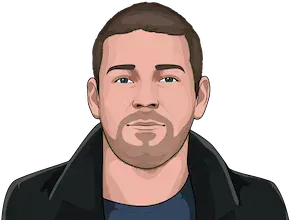
One file, everywhere
New tools, new abilities